Top up


TL;DR
A reliable group voice chat room starts with a clear purpose, a specific name and description, and a simple plan for who speaks when. Review every available access and participation setting before opening. During the session, welcome listeners, explain the speaking process, manage disruptions with the current host tools, and end with a clear close. Do not promise privacy beyond the controls you can verify.
To host a group voice chat room, define the topic, open your room settings, choose the options currently available to your account, and explain how listeners become speakers. Xena's official FAQ points hosts to Profile, My Room, and Room Settings for the room name, topic, microphone layout, and participation controls. Exact options can vary by account and room status.
Plan the room before you open it
Write one sentence that defines the room's purpose. Then choose a name and description that tell participants what will happen, who the conversation is for, and how long it is expected to run. A specific description helps listeners decide whether to enter and gives the host a neutral reference when the discussion drifts.
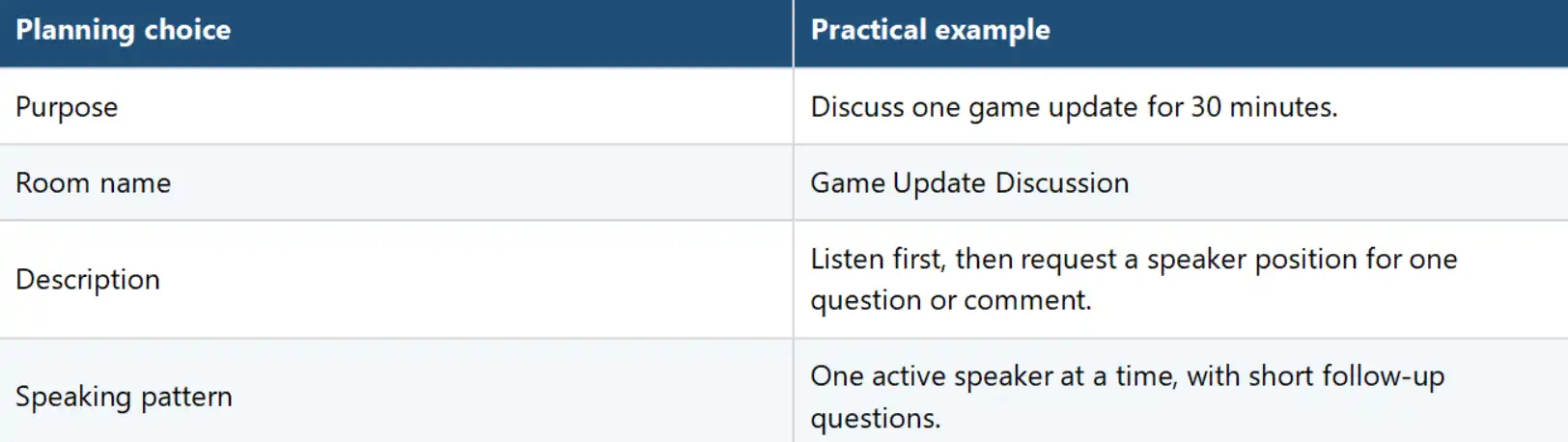
On Xena, official product information says hosts can set a room name, topic, description, and speaker positions. The FAQ also says microphone layouts and participation controls may depend on account eligibility and room status.
Create the room and review current controls
1. Open Profile and select My Room, following the current Xena FAQ path.
2. Open Room Settings and enter the room name, topic, and description.
3. Review the microphone layout and the participation controls available to your account.
4. Check any access or visibility choices shown in the current interface and read their descriptions before selecting one.
5. Enter the room as a host and confirm that the title, description, and speaking process are visible and accurate.
6. Open only when you are ready to welcome listeners and manage speaker requests.
Do not infer a control from a broad label. If the app presents public, private, invite, or another access option, use the description shown in the current interface. Access rules and privacy are different: a restricted entry method does not by itself guarantee confidentiality.

Public and private room decisions
A public room is generally intended for discovery by a wider audience, while a private or restricted room limits entry through the service's available access method. The appropriate choice depends on the discussion and the participants. Use a broadly discoverable setting for an open topic with clear rules. Use a restricted setting for a defined group, then confirm who can enter and how invitations work in the current product.
· Never describe a restricted room as completely private unless the platform's current policy and controls support that claim.
· Avoid sensitive personal, financial, medical, legal, or identity information in any social voice room.
· Tell participants what access setting you selected and what it does, without overstating it.
General and topic room structures
A general room supports an open conversation within broad community rules. A topic room narrows the discussion to one subject or activity. Use a general format when participants already share context and the goal is casual conversation. Use a topic format when people need a clear reason to join, a defined agenda, or a predictable speaking order.
Treat these as planning structures unless the current app explicitly uses those labels. A room can still have a focused topic even when the interface offers only a name and description. The host's job is to make the purpose understandable, not to force a label the product does not show.
Manage the room while it is live
Start with a short welcome: state the topic, explain how to request a speaker position, and name the behavior expected in the room. Keep the explanation under a minute so the session can begin. When several participants want to speak, use the available host controls and a visible or verbal queue.
· Redirect off-topic comments by restating the room purpose.
· Pause repeated interruptions and explain the speaking order once.
· Use the current participation controls when someone prevents the session from continuing.
· For conduct that may break Xena's rules, open the account or room menu, select Report, choose the closest reason, and add useful context.
· End the session if the available controls are not enough to keep the room manageable.
Xena's safety page also identifies leave, block, and report options. No moderation process prevents every problem, so hosts should keep expectations modest and act promptly when a conversation becomes unsafe or disruptive.
Close the room clearly
Give a brief warning before the planned end, take the final speaker, and summarize only the room's stated topic. Do not repeat personal disclosures. Thank participants, remind them where to find any approved follow-up resource, and use the current room control to end or leave the session. Afterward, review reports or support needs through the official in-app route.
Frequently Asked Questions
How do I create a room on Xena?
The current Xena FAQ directs users to Profile, then My Room. In Room Settings, hosts can review the room name, topic, microphone layout, and available participation controls.
Should I make a room public or private?
Choose based on the audience and the exact access controls shown in the current app. Explain the setting accurately and avoid promising confidentiality that the product does not confirm.
What is the difference between a general room and a topic room?
A general room allows broader conversation. A topic room sets a narrower subject, agenda, or activity. Use these as planning structures unless the product displays the same labels.
How should a host handle interruptions?
Restate the topic and speaking order, then use the participation controls currently available. Report conduct that appears to violate the platform's rules.
When should a host end the room?
End when the goal is complete, the planned time has passed, or the available controls cannot keep the session useful and manageable.