Top up


TL;DR
Voice chat lets participants talk and listen over the internet in real time. A voice chat room gives that conversation a shared space, usually with a topic, hosts, listeners, and speaker positions. Unlike a phone call, a room can support changing participants and a more public or community-led flow. Review the room description and controls before you join, and leave or report concerns when needed.
Voice chat is live, internet-based audio communication. In a voice chat room, several participants can gather around a shared topic while hosts organize speaking turns and listeners decide when to take part. The exact controls vary by service, account, region, device, and app version, so the room screen remains the source of truth for any session.
What voice chat means
Voice chat carries spoken audio between connected devices so participants can hear one another without being in the same place. It can appear inside a game, a community app, a meeting product, or a dedicated social-audio service. The useful distinction is the communication mode: people exchange live voice rather than waiting for recorded messages or relying only on typed posts.
A voice chat room adds a shared destination. Participants enter the same room, see the room context, and hear the active speakers. A group voice chat room is designed for more than two participants, although the number of people who can speak at once depends on the room format and current product controls.

How a voice chat room works
Most rooms separate listening from speaking. Listeners can follow the conversation without taking a speaker position. Speakers use an available microphone position or request permission, depending on the room. Hosts set the room context and manage participation. Some services also use moderators, but the exact permissions are specific to each platform.

On Xena, official product pages describe group voice rooms, microphone controls, speaker positions, room discovery, and room hosting. The Xena FAQ says participants can select a room, listen, then use an available microphone position or request permission to speak. Current options may still vary by account and room.
From finding a room to leaving it
- Open the app and review the available room categories, names, and descriptions.
- Choose a room whose topic and visible rules match what you want to hear.
- Enter as a listener first and check the current speakers, volume, and pace.
- If you want to speak, use an available microphone position or follow the room's request process.
- Mute when you are not speaking and avoid sharing sensitive personal details.
- Leave immediately if the conversation is no longer useful or feels uncomfortable. Use block or report controls when appropriate.
This sequence explains how voice chat rooms work without assuming that every app uses the same buttons. On Xena, the current room screen and official help pages should guide the exact taps.

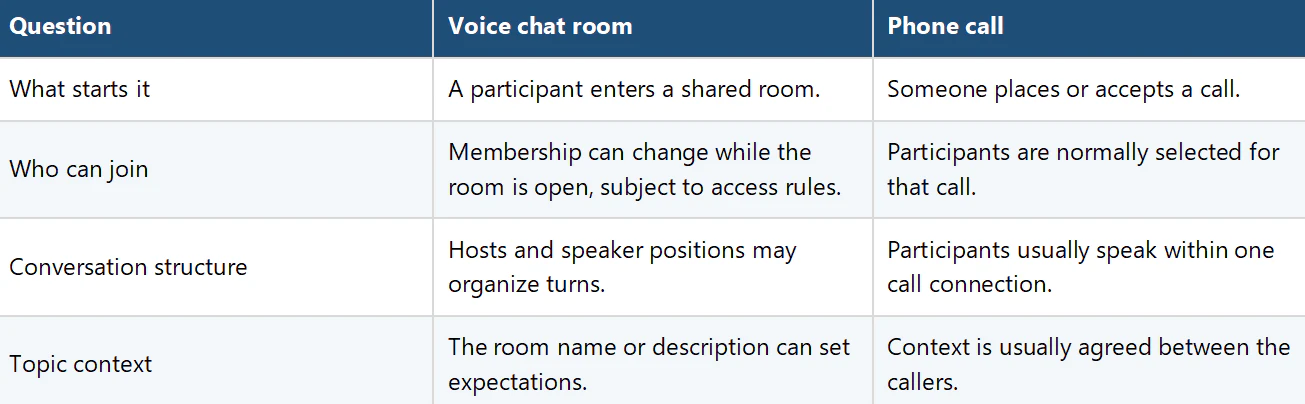
Voice chat room compared with a phone call
How voice rooms relate to chat rooms
The phrase chat room is broad. Search results may refer to typed community rooms, video spaces, customer support, or live audio. A voice chat room specifies that live audio is the central interaction. That difference matters when you choose a service: a page that promises only a chat room may not provide the speaker positions, microphone controls, or host-led structure you expect from a voice room.
The word free also needs context. It may describe download or basic access rather than every optional feature. Check the current official product page, store listing, and in-app terms before making a decision.
First room checklist
- Use an official download source and keep the app updated.
- Read the room name, description, and visible rules before speaking.
- Check your microphone permission and audio level.
- Listen long enough to understand the topic and speaking order.
- Keep passwords, verification codes, exact location, and identity documents private.
- Know where the leave, block, and report controls are located.
Frequently Asked Questions
What is a voice chat room?
It is a shared online space where participants hear live audio and may take speaking roles. The room can have a topic, listeners, speakers, and hosts.
Can I listen before I speak?
Many voice-room formats support listening before speaking. On Xena, the official FAQ says participants can enter a room and then use an available microphone position or request permission to speak.
Is a voice chat room the same as a phone call?
No. A room is a shared destination where participation can change, while a phone call is a calling session among selected participants.
Does chat room always mean voice chat?
No. The term can describe typed, video, or audio spaces. Look for explicit references to voice rooms, microphone controls, and speaker positions.
What should I do if a room feels uncomfortable?
Leave the room. If the situation warrants it, use the service's block or report controls and avoid sharing additional personal information.