Top up

TL;DR:
Try seven online party ideas for group voice chat rooms: Would You Rather, Guess the Word, team trivia, storytelling, Twenty Questions, themed chats, and birthday shout-outs or open mic. Start with a five-minute icebreaker, choose two main activities, and take turns speaking. On Xena, hosts can organize participation with speaker seats and room settings, or explore Ludo and PK battles for built-in activities.
Everyone has joined the room. Someone says hello, a few people reply, and then the conversation stalls. A simple activity gives everyone something to respond to—and takes the pressure off whoever usually keeps the conversation going.
These online party ideas work without cameras or complicated equipment. Pick a short icebreaker, add one main activity, and leave room for conversation. Below, you’ll find rules, sample prompts, and practical ways to organize a party in a Xena voice chat room.
Quick Picks: Find an Activity for Your Group
The player counts below are suggested group sizes for these activities, not Xena room limits.
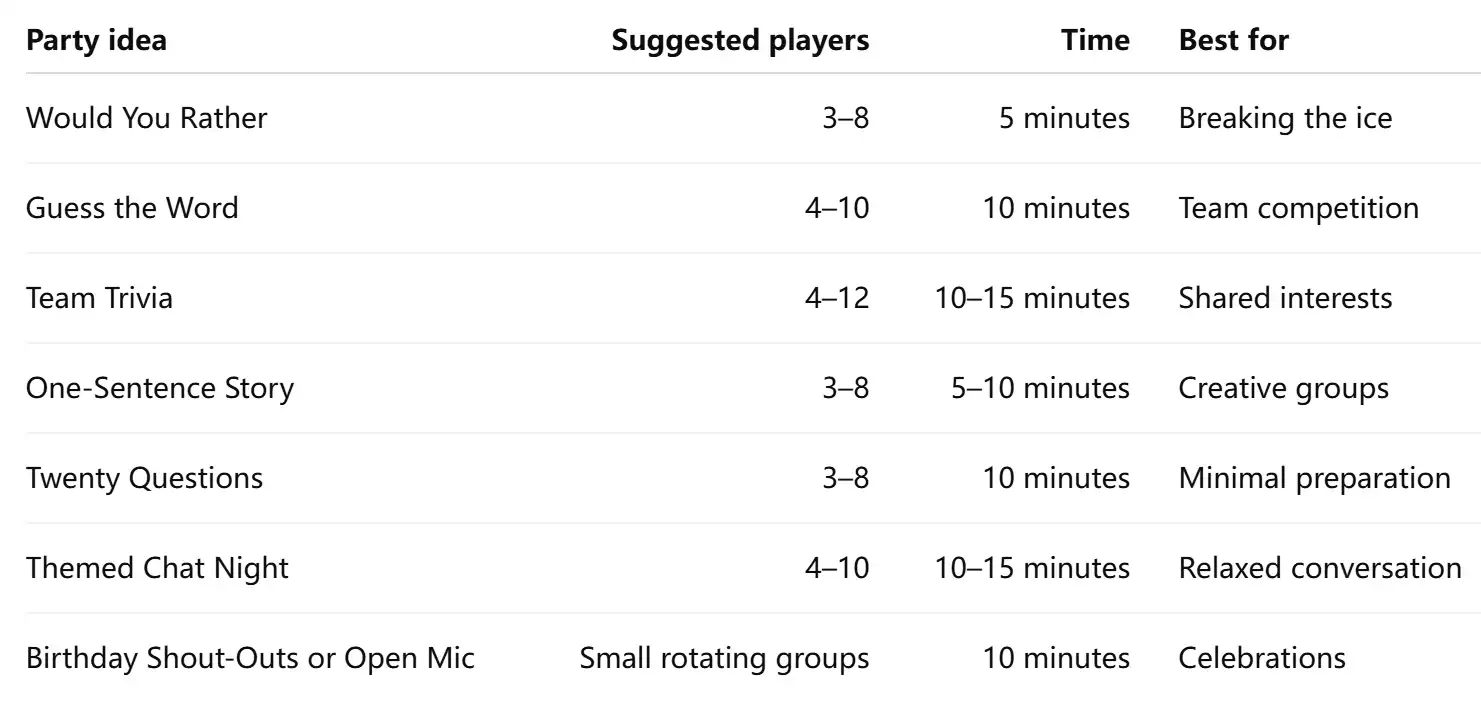
These are host-led activities: prepare your own prompts, explain the rules aloud, and keep score yourself where needed.
7 Online Party Ideas to Try in a Voice Chat Room
1. Break the Ice with Would You Rather
Start with a choice that takes only a few seconds to answer:
“Would you rather explore space or the deep ocean?”
Go around the group. Each person chooses an option and gives one reason. Ask a follow-up when an answer sparks interest, but keep the opening round moving.
Food, travel, films, and everyday habits make easy starting points. Avoid questions that push people to reveal relationships, income, or other personal details.
On Xena, entering a voice room doesn’t automatically put someone on a microphone position. Let people listen first, then explain how to join the speaking round when they’re ready.
2. Play Guess the Word in Teams
Split willing players into two teams. One player describes a word while their teammates try to guess it within 45 seconds. They cannot say the word itself or a close variation.
For headphones, a clue could be:
“You wear these to listen to music without disturbing anyone.”
Prepare around ten everyday words before the party. Award one point for each correct answer, then switch teams.
Announce who is describing and who is guessing before each round. This works better than inviting the whole room to shout answers, especially when some participants have a slight connection delay.
3. Host a Short Team Trivia Night
Choose one accessible theme, such as films, food, sports, or general knowledge. Prepare five questions with clear answers and start with an easy one:
“Which planet is known as the Red Planet?”
Give each team 15 seconds to agree on an answer, with one spokesperson responding. Alternate questions between teams and finish with a tie-breaker if needed.
For an international group, avoid building every question around one country’s television shows or school curriculum. Mix familiar topics and explain unfamiliar references.
Keep this separate from Xena’s built-in PK battles: this trivia format uses your own questions and scoring.
4. Build a Story One Sentence at a Time
Give the group an opening line:
“Someone knocked on the door, but the voice outside sounded exactly like mine.”
Each player adds one sentence. After two rounds, ask the next person to bring the story to an ending.
Set the speaking order before starting so nobody has to guess when to jump in. If someone gets stuck, offer a prompt: “What was behind the door?”
Xena’s visible speaker seats can help you explain the order. Agree on a sequence using the names currently on mic, then repeat the next person’s name as you hand over.
5. Run a Twenty Questions Challenge
One player secretly chooses an object, animal, or place. Everyone else asks questions that can be answered with “yes” or “no.”
For example:
- “Can you find it indoors?”
- “Does it need electricity?”
- “Would it fit in a backpack?”
The group has up to 20 questions to identify the answer. Take turns asking, and count a direct guess as one question.
Choose a category before starting to keep the challenge manageable. Everyday objects work well for a first round; obscure fictional characters are better saved for a group that shares the same interests.
6. Turn a Theme into a Mini Party
A theme becomes useful when it gives people something specific to do.
For a travel night, ask each participant to describe a destination without naming it. Everyone else guesses, then the speaker explains why they want to go.
For a film night, use three clues to describe a movie. Start with a broad clue and make each one easier.
If you’re hosting on Xena, open Profile → My Room and use the room settings to update the name and topic. A clear title such as “Movie Clues: Take Turns Guessing” tells arriving participants what to expect.
7. Finish with Birthday Shout-Outs or Open Mic
For a birthday party, give each willing participant a short turn to share a wish or a favourite memory. Ask the birthday guest beforehand whether they’re comfortable being the focus.
For a regular gathering, offer an open mic: a joke, an original poem, or a one-minute story.
Keep each contribution brief and allow people to pass. One person speaks at a time, followed by reactions.
If the group would rather play, Xena also offers Ludo and team-based PK battles alongside voice chat. Check the available activities and access requirements before planning your party around them.

Set Up Your Xena Room Before the Party
Check the speaker layout before deciding how many people will take part in each round. In Xena, go to Profile → My Room → Room Settings → Microphone Count to view the layouts available to your account. Available options depend on account and room status.
Then prepare three things:
- A short welcome: explain the activity, speaking order, and how long it will last.
- A practice round: demonstrate one question or clue before keeping score.
- A backup activity: have a few Twenty Questions categories ready if the main game finishes early.
Ask participants to use headphones where possible. Before starting, check that each player can hear the host and be heard.
A Simple 30-Minute Party Plan
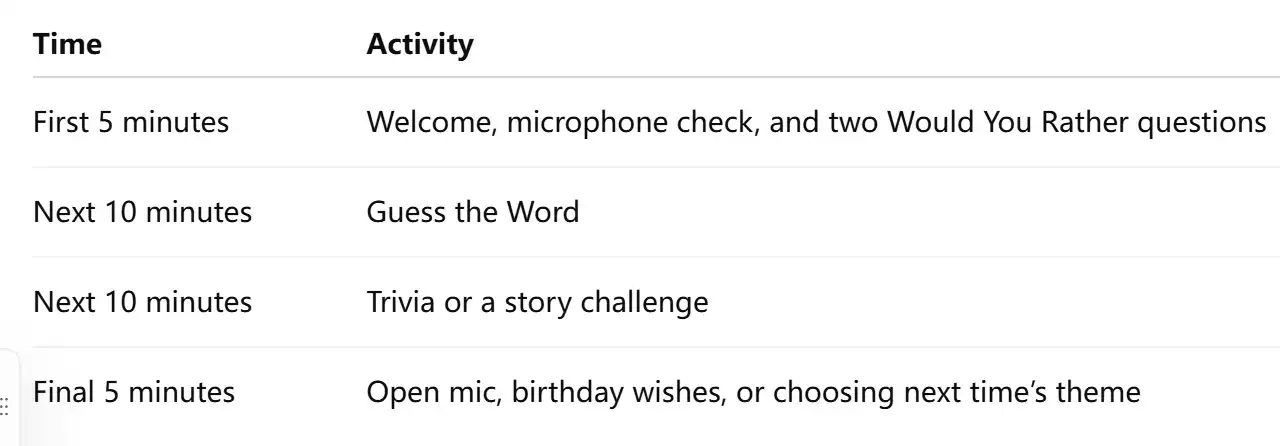
For a first party, two main activities are enough. If a round starts a good conversation, leave a little space for it.
FAQs About Group Voice Chat Parties
What if someone joins halfway through a game?
Finish the current turn, explain the rule in one sentence, and offer them the next available round. They can listen to an example before participating.
What if someone can hear us but cannot speak on Xena?
Check whether they have taken an available microphone position or requested permission. Some rooms require host or moderator approval. If they’re already on mic, check microphone permission and connected audio devices.
What if more people want to play than there are speaker seats?
Run short rounds with rotating players. Explain the rotation beforehand so listeners know when their turn is coming, and avoid changing the order halfway through.
Can we play without using a game room?
The spoken activities above use host-prepared questions and rules. They don’t require a built-in game. Xena’s game rooms are a separate option for supported in-room games.
Choose one idea, prepare a few prompts, and start small. Download Xena to join a group voice chat room or host your own online party—with a plan ready for what happens after “hello.”