Top up


TL;DR
If you want an AirTALK alternative for group voice chat, start with the kind of conversation you enjoy. Xena combines hosted voice rooms, online parties, Ludo, and team-based PK. Discord suits ongoing communities, Yalla offers casual social voice rooms, and Free4Talk focuses on language practice. Compare how you find conversations, get permission to speak, and return to groups you enjoy.
AirTALK makes spontaneous conversation straightforward: open the site, choose voice or text, and connect with another person without turning on a camera. But sometimes you want to hear several perspectives, join a conversation already underway, or have an activity to talk around. AirTALK’s published experience centers on random matching; the alternatives below offer different ways to participate in a group.
This guide is published by Xena and compares publicly documented features rather than assigning an overall winner.
What Changes When You Switch to Group Voice Rooms?
In a matched conversation, much of the momentum depends on two people. A group room gives you more voices and an existing topic to respond to. You might listen to a discussion, contribute when there is an opening, or join an activity.
However, joining a room does not always mean your microphone becomes available immediately. Some platforms use speaker seats, host approval, or channel permissions to organize participation.
The useful question is therefore more specific than “Which app has voice chat?” Ask how you enter the conversation, who manages speaking turns, and whether you can find that community again. Those details shape the experience more than a long feature list.
AirTALK Alternatives at a Glance
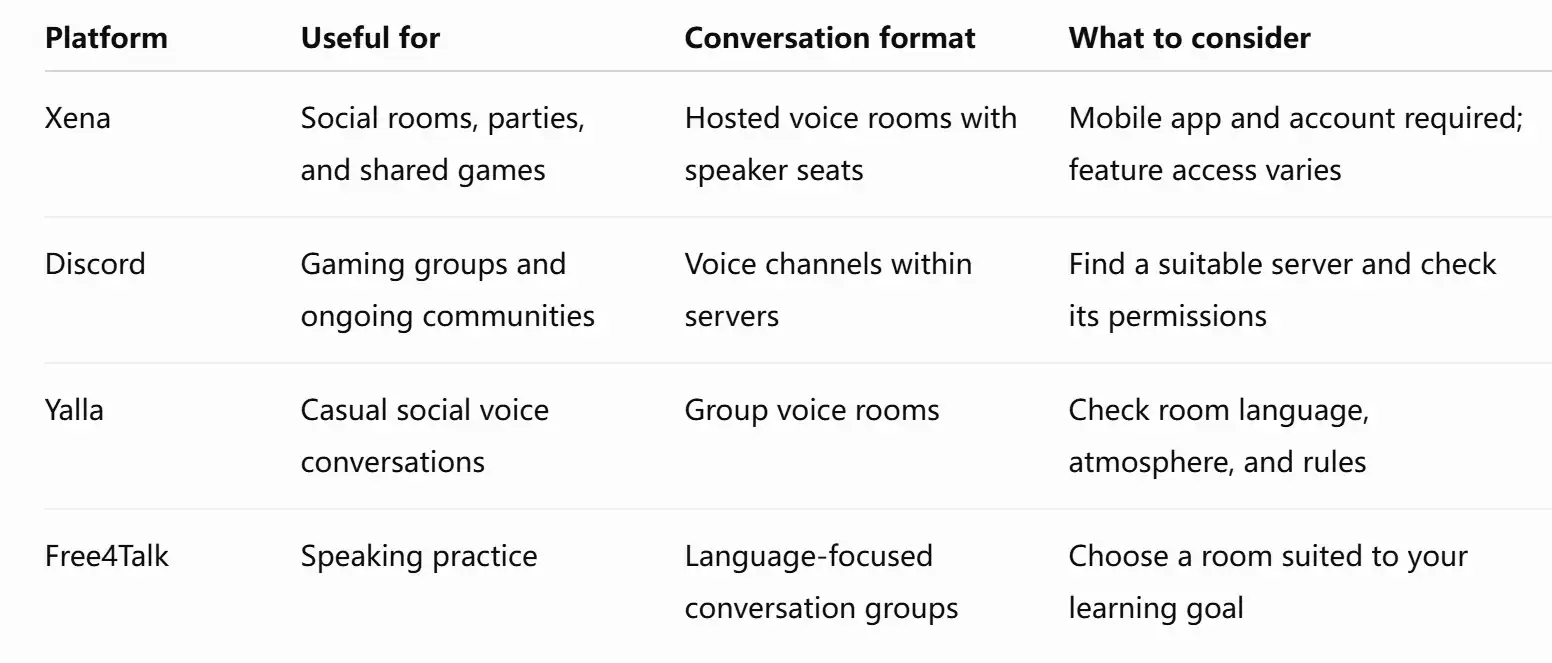
These are alternatives for different group-chat needs, rather than identical replacements for AirTALK’s browser-based matching.
4 AirTALK Alternatives for Different Group Chat Needs
Xena — Voice Rooms, Online Parties, and Ludo
Xena is a group voice chat app for adults aged 18 and over. It suits people who want conversation alongside hosted activities, rather than having to carry every exchange themselves.
In the Chat Rooms section, browse by topic, language, activity, or community. Read a room’s name and description, then enter and listen before deciding whether to speak. To participate, tap an available microphone position or request permission. Some rooms require approval from the host or moderator. Entering a room and getting a speaking position are separate steps.
For a change of pace, Xena includes Ludo and team-based PK alongside voice chat. A game can give the group something specific to react to, while following voice hosts helps you return to conversation styles you enjoy. Availability and access requirements can vary, so check what your account currently supports.
If you want to host, open Profile → My Room. Room settings let you adjust the name, topic, microphone layout, and available participation controls. Under Room Settings → Microphone Count, you can see the layouts available to your account. A larger room layout is not automatically available to everyone.
Choose Xena if you want mobile voice rooms with a mix of conversation and entertainment. Downloading the app and creating an account are part of getting started.

Discord — Voice Channels for Ongoing Communities
Discord organizes communities into servers, with separate channels for different conversations. Its voice channels make sense when you want a regular place for a gaming group, hobby community, or recurring discussion.
You join an accessible voice channel rather than waiting for a random match. You can also keep your microphone muted while listening. Access depends on the server’s permissions, and creating or managing channels requires the appropriate role. Discord supports browser, desktop, and mobile use.
The main task is finding the right community. A server’s topic alone does not tell you how welcoming its conversations will feel. Read its rules, check which voice channels you can enter, and spend a little time listening.
Choose Discord when continuity matters: the same community, recognizable channels, and reasons to return beyond a single conversation.
Yalla — Casual Social Voice Rooms
Yalla is another option for people looking for social group voice chat. Its official product information describes a voice-centric platform combining rooms and casual games. That makes it relevant if you want a shared social space with activities as well as conversation.
When comparing it with other options, look at the rooms you would actually join. Is the main language comfortable for you? Is the conversation relaxed, structured, or activity-focused? Does the room description make participation expectations clear?
Also distinguish Yalla from Yalla Ludo: the company lists them as separate flagship applications. Check the exact app and its available features before downloading.
Choose Yalla if browsing casual social voice rooms matches how you want to spend your time.
Free4Talk — Group Conversations for Language Practice
Free4Talk is worth considering when your main reason for joining a voice group is speaking practice. Its focus is language conversation, giving you a clearer purpose than simply finding someone to talk to.
Look for a room whose language, title, and stated level fit your goal. A beginner practicing introductions may want a different group from someone preparing to discuss current affairs. Free4Talk’s room format is organized around language practice rather than the entertainment focus of a party app.
Treat peer conversation as practice, with any feedback depending on the participants. Before settling in, ask whether the group is doing open conversation, taking turns, or following a particular exercise.
Choose Free4Talk when a clear learning goal will help you contribute and keep the conversation moving.
How to Choose a Room You’ll Want to Stay In
Start with the conversation, then consider the features.
Check the language and topic. A room with plenty of participants is only useful if you can follow what they are discussing. A specific topic also gives you an easier opening than a vague room title.
Understand how speaking works. Look for microphone status, available seats, requests, or channel permissions. In Xena, for example, a room may require host approval before you speak; a short wait does not necessarily indicate a technical problem.
Notice how the room is managed. Clear introductions and sensible turn-taking can make a busy room easier to follow. Familiarize yourself with the available controls and leave if the atmosphere does not suit you.
Try a short visit first. You do not need to commit to a community before hearing its conversation.
FAQs About AirTALK Alternatives
I want to talk with several people at once. What should I look for?
Look for explicit support for group voice rooms or voice channels. Group messaging alone does not establish that several participants can speak together. Then check how many speaking positions are available and whether you need permission to use one.
Can I join a group voice room and listen before speaking?
Some platforms support this. Xena lets you enter and listen before taking or requesting a speaker seat, while Discord lets you keep your microphone muted in a voice channel. Check your microphone status when joining.
Can I use an alternative without downloading an app?
Discord supports browser access. Xena requires its mobile app on a compatible Android or iOS device and an account to enter rooms. If avoiding installation is essential, check browser support before choosing a platform.
Find Your Next Group Conversation
Choose the format that gives you a reason to participate: a familiar community, language practice, a hosted discussion, or a shared game. For adults who enjoy voice rooms, online parties, and Ludo, download Xena and explore a room that matches your interests.